
Alt Text for a Person, Not a Crawler
I’m so sick of seeing “SEO specialists” charge small firms three grand for a “comprehensive accessibility audit” that basically just tells you to describe your pictures. It is absolute nonsense. Most of these agencies try to turn something simple into a complex, multi-month project involving spreadsheets and specialized software, but that is just a way to pad an invoice. If you are a solo founder or a tiny team, you don’t need a strategy document; you need to know how to write alt text that actually works without eating up your entire week.
I am not here to give you a theoretical lecture or a twenty-page manual. My promise is simple: I’m going to show you how to fix your image descriptions using practical, afternoon-friendly tactics that you can implement right now. We aren’t going to obsess over every single archive photo from 2014; instead, we will focus on the high-impact stuff that helps your customers and your search rankings. By the time you finish reading, you’ll have a workflow that takes less than thirty minutes to get moving.
Descriptive Image Text That Actually Works
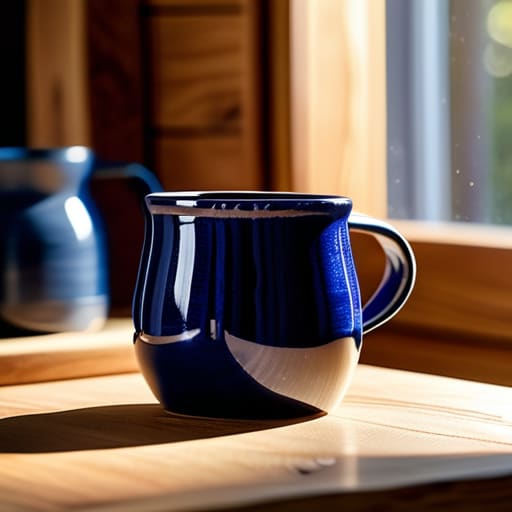
Stop treating your image descriptions like a chore or a technical checkbox. Most people make the mistake of being too vague, like labeling a photo “product shot,” or too robotic, like “IMG_402.jpg.” Neither helps your customers or your rankings. Instead, focus on descriptive image text that captures the intent of the photo. If you’re posting a picture of your handmade ceramic mug, don’t just say “mug.” Say “Hand-thrown blue ceramic mug with a wide handle on a wooden table.” It’s fast, it’s accurate, and it actually tells a story.
If you want to touch on SEO image optimization without spending hours on it, keep your descriptions punchy. You aren’t writing a novel; you’re providing a snapshot. A screen reader user shouldn’t have to guess what they’re looking at, and Google’s crawlers should be able to categorize your content easily. My rule of thumb? If you can’t describe the image in under fifteen words, you’re probably overcomplicating it. Just look at the photo, say what you see out loud, and type it in. You can knock out the descriptions for your entire homepage in the time it takes to finish a coffee.
Quick Wins for Seo Image Optimization

Stop trying to master every complex web accessibility standard in one sitting. You don’t need a certification to see results; you just need to stop leaving your image files named `IMG_5432.jpg`. That is a wasted opportunity. Spend thirty minutes this afternoon renaming your top ten most visited product images to something that actually describes them. If you are selling a blue ceramic mug, call it `blue-ceramic-coffee-mug.jpg`. This simple act of SEO image optimization tells search engines exactly what they are looking at without requiring a degree in computer science.
Next, look at your file sizes. I see small business sites loading like they’re stuck in 2005 because they’re uploading massive, uncompressed files straight from a smartphone. It kills your load speed, which kills your ranking. Grab a free compression tool, shrink those files down, and save them. While you’re at it, ensure your descriptive image text isn’t just a string of keywords. If a human reading a screen reader would find your description jarring or nonsensical, you’ve missed the mark. Keep it lean, keep it accurate, and get back to your actual job.
Five ways to stop overthinking your alt text
- Stop trying to be a poet. If the photo is a blue ceramic mug on a wooden table, just write “blue ceramic mug on wooden table.” You don’t need a narrative; you need a description.
- Skip the “image of” or “picture of” fluff. Screen readers already tell the user it’s an image. Using those extra words is just wasting your time and theirs.
- Use your keywords, but don’t be a spammer. If you sell organic coffee, “organic coffee beans in a burlap sack” is great. “Cheap coffee best coffee coffee beans” is a disaster that will get you nowhere.
- Check your top five most visited pages. Don’t try to fix your entire website today. Just spend twenty minutes auditing the images on your highest-traffic pages to ensure they actually make sense.
- If the image is purely decorative—like a line divider or a generic swirl—just leave the alt text empty. There is no prize for describing a squiggle that adds zero value to the customer.
The Afternoon Audit Checklist
Stop aiming for perfection; just spend twenty minutes writing decent descriptions for your ten most important images.
If an image is purely decorative—like a random line or a spacer—leave the alt text blank so you don’t waste time.
Treat alt text like a quick caption for a friend: describe what is actually in the photo without using fluff or keyword stuffing.
Stop Overthinking It and Just Do It

Look, we’ve covered the essentials: stop using “image of” (your code already knows it’s an image), keep your descriptions punchy, and weave in your keywords without making it look like a robot wrote it. You don’t need a complex SEO audit or a week-long project to get this right. If you can spend twenty minutes this afternoon scanning your most important product pages and updating those descriptions, you’ve already done more than most of your competitors. The goal isn’t perfection; it’s about making your content accessible and helping search engines actually understand what you’re selling.
Marketing shouldn’t feel like a heavy lift that requires a dedicated agency and a six-figure budget. If a task feels too big to tackle before your next coffee break, you’re probably overcomplicating it. Alt text is one of those small, high-impact moves that builds your foundation without draining your energy. Stop waiting for a “perfect strategy” to land on your desk and just start where you are. Fix ten images today, move on to your actual job, and trust that these small, practical wins will compound into real results over time.
Frequently Asked Questions
Do I really need to write alt text for every single decorative icon or tiny button on my site?
No. If you try to write alt text for every single decorative squiggle or tiny arrow, you’ll waste your entire afternoon and achieve nothing.
How long should these descriptions actually be before they start looking like spam?
Keep it under 125 characters. Anything longer and screen readers start to sound like they’re glitching, which is a terrible user experience. If you find yourself writing a paragraph, you aren’t writing alt text; you’re writing a caption. Stop. Just describe what’s in the frame clearly and move on. If you can’t say it in one quick sentence, you’re overthinking it and wasting time you don’t have.
Should I be stuffing my main keywords into the alt text just to rank higher?
Absolutely not. Keyword stuffing is a lazy shortcut that backfires. If I see an alt tag that reads “affordable plumber London plumber cheap plumber,” I don’t see a marketing genius; I see someone trying to trick a system that is much smarter than they are. It creates a terrible experience for screen readers, too. Just describe the image naturally. If it’s a photo of a wrench, say “silver adjustable wrench on a workbench.” Done.
If I've already uploaded hundreds of photos, is there a fast way to fix this without losing my mind?
Don’t try to fix everything at once; you’ll burn out by Tuesday. Use the 80/20 rule. Go to your most visited pages—your homepage, your top three services, and your best-selling product—and fix those first. That’s probably twenty images. Spend one afternoon doing just that. If your high-traffic pages are covered, the rest can wait until you have another spare hour next week. Focus on the impact, not the volume.
